Sehatie Script: A Font for Polished Branding
As a small business owner, I know how important it is to make every detail count. From the first glance of a product label to the last line of a thank-you card, typography plays a big role in how customers perceive your brand. Recently, I was working on updating a set of custom packaging for a local bakery, and I found myself searching for a font that could bring a touch of elegance without sacrificing clarity. That’s when I discovered Sehatie Script.
What Is Sehatie Script?
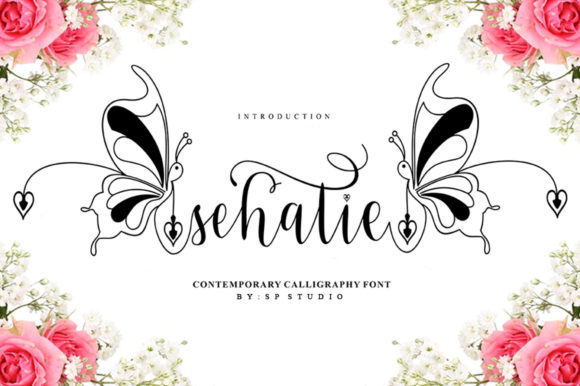
Sehatie Script is a refined script font that exudes sophistication and grace. Its flowing lines and stylish alternates give it a unique personality that feels both modern and timeless. What sets it apart is its attention to detail—each character is crafted with care, making it ideal for projects that demand a touch of class. Whether you're designing a logo or adding a decorative element to a menu, Sehatie Script offers a versatile yet distinctive look.
Real-World Use Cases for Sehatie Script
One of the first places I tested Sehatie Script was on a bakery's packaging. The bakery wanted to update their box design to feel more premium while maintaining readability. Using Sehatie Script for the product name and tagline gave the boxes a fresh, professional look. The font’s ligatures and alternates added a subtle flair that made the branding feel more intentional.
Another project involved a skincare brand looking to refresh their product labels. They needed a font that could stand out on a shelf but still feel approachable. Sehatie Script worked well as a headline font, drawing attention without being overwhelming. It paired beautifully with a clean sans serif for body text, creating a balanced and cohesive design.
When to Use Sehatie Script
Sehatie Script shines best as a display font. It’s perfect for headlines, logos, and short phrases where visual impact matters most. For example, using it on a café’s menu title or a boutique’s product tags can instantly elevate the overall look. However, it’s not ideal for long blocks of text due to its intricate details, which can affect readability at smaller sizes.
When using Sehatie Script on printed materials like labels or packaging, it’s important to keep the text size generous enough to ensure legibility. On digital platforms such as social media thumbnails or online shop banners, the font can add a personal touch without overshadowing the message.
Pairing Sehatie Script with Other Fonts
One of the strengths of Sehatie Script is how well it pairs with other typefaces. For a balanced look, consider pairing it with a simple sans serif like Montserrat or a classic serif like Georgia. This contrast helps guide the viewer’s eye while keeping the design harmonious. If you're going for a more casual vibe, a handwritten font like Pacifico can work well too.
For a more modern aesthetic, try combining Sehatie Script with a geometric sans serif like Roboto or Open Sans. This creates a clean, contemporary feel that still retains the elegance of the script font.
Practical Tips for Using Sehatie Script
Before finalizing any design, always test Sehatie Script in different sizes and contexts. Make sure it looks good on both digital screens and printed materials. If you’re using it for product labels or small tags, avoid overcrowding the text. Let the font breathe so it remains readable and visually appealing.
Also, check the font’s file formats and licensing before using it for commercial purposes. Sehatie Script is available in multiple styles, including regular, bold, and alternate versions, which can be useful for creating visual hierarchy in your designs.
Whether you're updating a website banner, designing a new logo, or creating social media graphics, Sehatie Script offers a polished and professional look that can help your brand stand out. Its versatility and style make it a valuable addition to any designer’s toolkit.