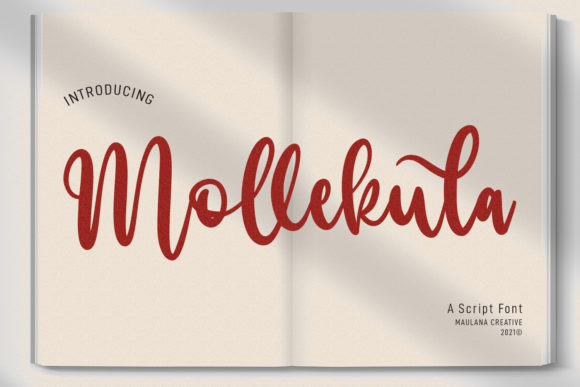
Mollekula Script: A Luxurious Handwritten Font
While working on a boutique online store project, I was looking for a font that could add a touch of elegance without sacrificing clarity. Mollekula Script caught my eye with its soft, flowing strokes and refined aesthetic. It felt like the perfect match for a brand that wanted to stand out while maintaining a clean digital presence.
This handwritten script font has a unique personality—light yet expressive, with a subtle sophistication that feels both modern and timeless. Its curves are fluid, and the overall design gives a sense of movement that can bring a website’s visual language to life. Whether used in headers, buttons, or decorative elements, it adds a luxurious spark to any design.
Testing Mollekula Script in Real Layouts
I started by testing it in the hero section of the online store. The headline stood out immediately, offering a striking contrast against the minimalist background. It worked well for a primary call-to-action, drawing attention without overwhelming the viewer. On mobile screens, the font remained readable, though I noticed that smaller text sizes required careful spacing to maintain legibility.
When placed over an image banner, Mollekula Script added a layer of visual interest without competing with the background. The font’s light weight allowed it to blend seamlessly, making it ideal for overlaying short phrases or taglines. For a coaching website, it provided a personal and approachable feel, reinforcing the brand’s message of connection and authenticity.
Use Cases for Mollekula Script
Mollekula Script is best suited for display purposes rather than body text. It shines in headers, section titles, and CTA buttons where it can command attention. In a product landing page, it helped highlight key selling points with a touch of style. For a creative portfolio, it gave the site a distinctive identity that felt both professional and artistic.
It also worked well as a logo font, adding a custom feel to the brand’s visual identity. When paired with a simple sans serif for body copy, it created a balanced and cohesive look. This font pairing strategy is common in web design, allowing the script font to serve as a focal point while the more structured typeface ensures readability across all devices.
In a blog redesign, Mollekula Script was used for the header and featured post titles, giving the site a fresh, modern edge. For a course sales page, it made the headlines more engaging, helping to guide the user through the content with visual cues.
Readability and Performance Considerations
On dark backgrounds, Mollekula Script retained its clarity, but I found that increasing the line height and letter spacing improved its legibility. For small buttons or icons, using the font at a larger size prevented it from appearing too cramped or difficult to read.
When used on image overlays, the font needed careful placement to avoid blending into the background. A subtle drop shadow or contrasting color helped it stand out while maintaining a polished look. For fast-loading websites, I made sure to optimize the font files and only include the necessary weights and styles.
Font Pairing and Design Integration
Pairing Mollekula Script with a clean, neutral sans serif like Open Sans or Lato created a harmonious balance between creativity and functionality. This combination worked well for landing pages, where the script font could be used for headings and the sans serif for body text.
For editorial-style designs, pairing it with a serif font like Georgia or Playfair Display added a more traditional and sophisticated feel. This approach is great for blogs, magazines, or content-heavy websites where a mix of styles can enhance the reading experience.
When integrating Mollekula Script into a digital brand kit, I made sure to test it across different platforms and formats. It performed consistently on social media graphics, email templates, and print materials, proving its versatility as a premium font.
Practical Tips for Web Designers
Before using Mollekula Script on a website, check the available styles and weights to ensure they align with your design needs. Many script fonts come in multiple variations, such as regular, bold, and alternate versions, which can add depth to your layout.
Make sure the font is available in webfont formats like WOFF or WOFF2 for optimal performance. Also, verify that it supports the languages you need, especially if your audience is global. Commercial licensing is another important consideration, as some fonts may require additional permissions for web use.
Overall, Mollekula Script is a versatile and elegant choice for web designers looking to elevate their digital projects. Its delicate yet impactful style makes it ideal for a wide range of applications, from branding to content presentation. With thoughtful implementation, it can help create a more polished and engaging online experience.